All vehicles
Class-wise parts checklist, AI damage scan and automatic settlement on OEM labour-rate schedules.
Parts & survey guide →AI damage detection, instant RC/DL OCR, a rate master that learns your rates, GPS-stamped evidence and ready-to-send reports — for motor, construction & engineering equipment, ambulances, hospital & medical equipment and general survey. Built for Indian surveyors.


Motor and non-motor — every type of survey. Motor gets the deepest automation (AI damage and OEM-rate assessment); the same capture → evidence → report workflow, with a parts checklist built for each class, carries everything else a surveyor and loss assessor handles.
Class-wise parts checklist, AI damage scan and automatic settlement on OEM labour-rate schedules.
Parts & survey guide →A machine-specific assembly checklist for each type — boom, bucket, tracks, hydraulics and more — with GPS evidence and a class report.
Parts & survey guide →CAR/EAR, erection and machinery-breakdown losses — stage-wise site evidence, make/serial capture and a clean engineering loss report.
Parts & survey guide →Transit, consignment and container losses — packing, seal and short/damage evidence with GPS-stamped photos and a cargo survey report.
Fire & allied-perils property losses — room/asset-wise damage, salvage and cause evidence, captured on site for a defensible fire loss report.

Part- and serial-wise condition of the unit, display, probes and accessories, with calibration/service status recorded in the report.
Every class can be surveyed on the phone or by a secure self-survey link — the insured sees simple, plain-language photo steps for that class, never technical part names. And every survey carries a secure, GPS & time-stamped video evidence link — a scannable QR on the report that opens the walk-around video, no app and no login.
Finish the survey on site and walk away with a ready report — no typist, no desk, no second trip to the office.
Work right from the accident spot, the garage — wherever the vehicle is.
The whole thing runs on the phone already in your pocket.
No typist, no assistant — the app does the paperwork for you.
Click the survey photos — each stamped with GPS, date & time.
Photograph the RC, DL & policy — AI OCR reads them and fills the form.
Click a photo of the bill; the report fills itself in your insurer's ready format. Check & submit.
AI fills most of the report — you check every value before it is submitted. The whole survey finishes on site, so there's no office visit and no second trip.
Three link-based surveys for when you and the vehicle can't be in the same place. Every photo is GPS- and time-stamped and the customer signs off on the link — so what comes back is verifiable, not just forwarded from a gallery.
The insured opens the link and uploads survey, repair & replacement photos, video and documents from their own phone — no app, no login.
Unlimited · FreeInspect on a live video call and capture GPS-stamped photos yourself while you guide the customer around the vehicle.
Unlimited · FreeOwner does the break-in (pre-insurance) inspection — guided angles, 360° walk-around video, with RC and GPS on every photo.
Unlimited · Free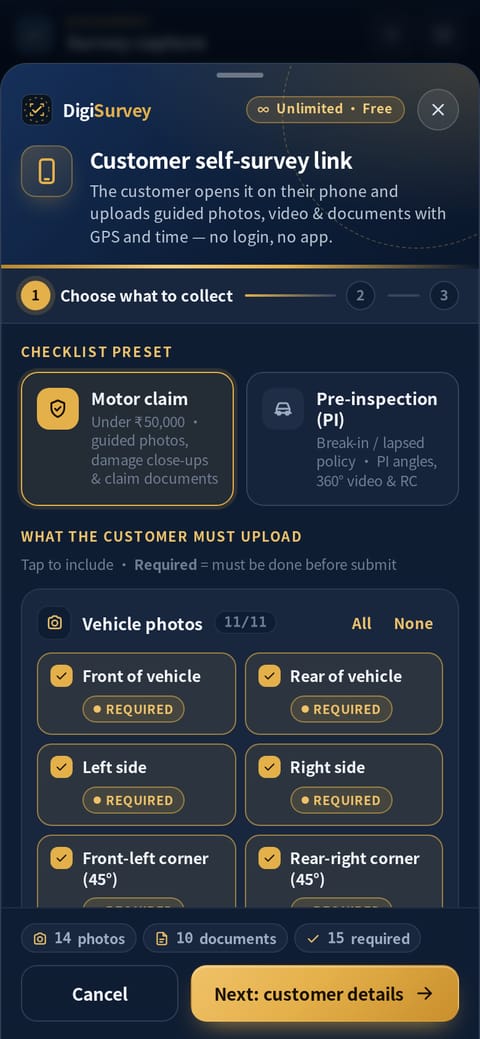
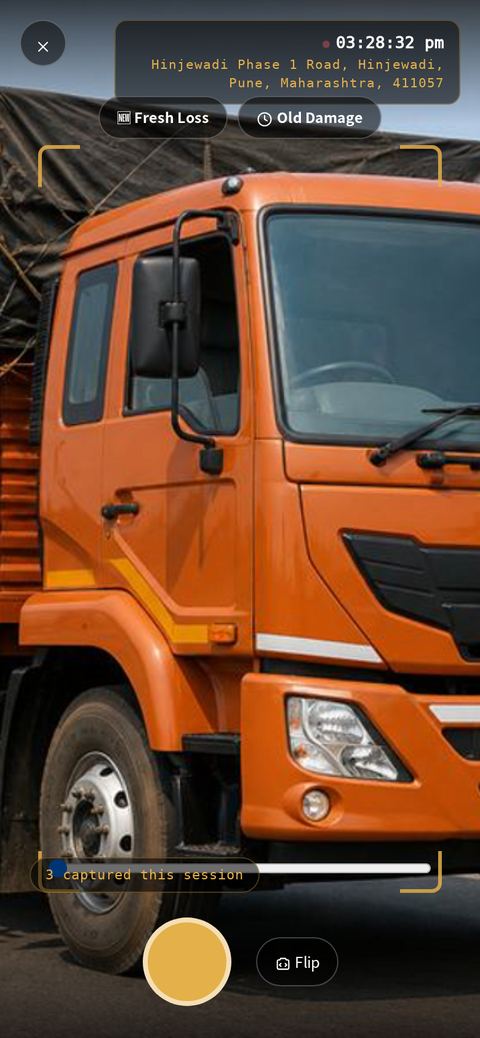
Location, date and time are stamped as the photo is taken on the link, not added later.
Pre-inspection links only accept photos and video shot in the last few minutes, so old gallery shots can't slip in.
The insured types their name and signs on the link — name, signature, date & time are saved with the claim.
Every finished report carries a QR code anyone can scan to confirm it's genuine.
Share a secure link and the insured sees the loss-assessment summary, agrees to the declaration and signs with a finger. Their name, signature and the exact date & time are recorded and carried into the report — so the claim file shows the insured saw and accepted the assessment.
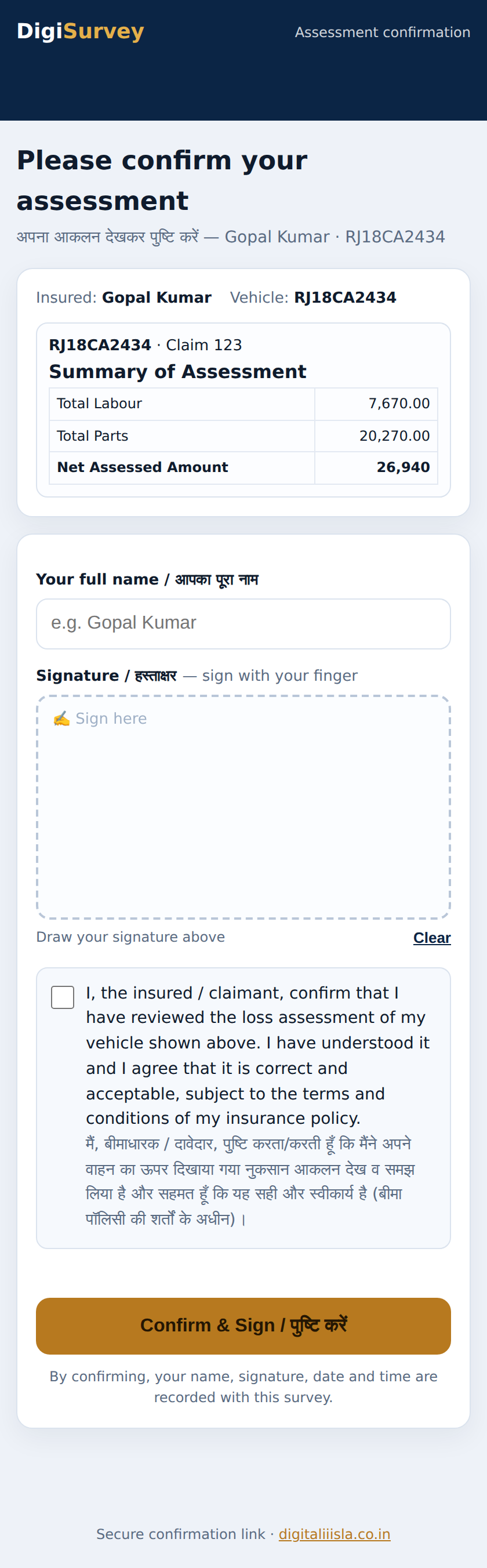
GPS and time stamps, the freshness window and the insured's signature make every photo and report verifiable — you can check where and when a photo was taken and that the insured signed off. AI assists the drafting; you review every value before you submit.
Every feature in DigiSurvey rolls up into five pillars — so a complex survey workflow stays one simple, connected system.
Built for insurance companies and their surveyors to inspect motor claims remotely — we deliver remote survey services in line with IRDAI's guidelines for video-based / remote motor surveys.
Live camera, GPS & timestamp, works offline at the site.
AI OCR for RC/DL/policy, vehicle & damage recognition.
Parts, labour, painting & depreciation on OEM rates.
Word-style report editor, photos, templates & e-sign.
QR verification, audit trail & tamper-aware evidence.
The vision engine detects the body panels and flags visible damage with a severity and a repair-or-replace suggestion. You review every call and decide — AI assists, the surveyor stays professionally responsible.
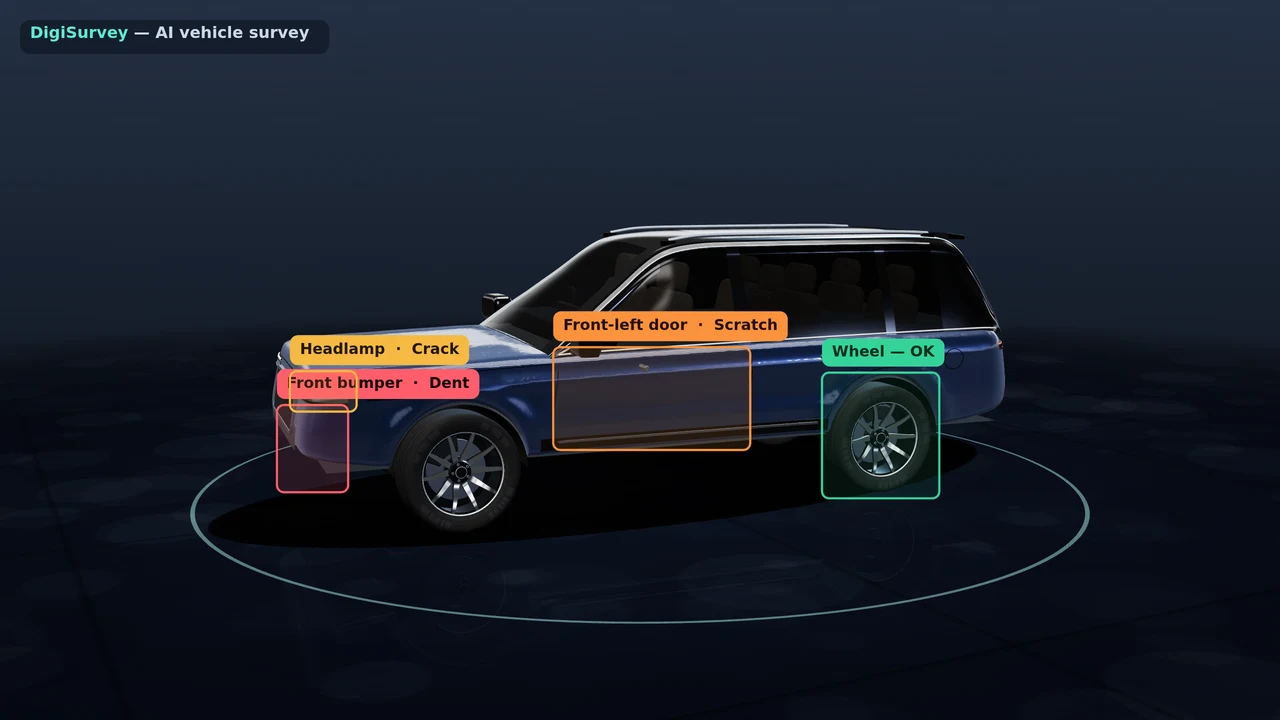
Every DigiSurvey case is built from layers of structured, verified evidence captured around a single vehicle — angles, damage, documents, location and time — then turned into one professional report.
Every layer above is live today in DigiSurvey. AI assists on vision and documents; the licensed surveyor reviews and confirms every value before it enters the report.
No switching between windows, no rate books, no back-and-forth. The report sits beside the photos and documents, the rates settle themselves, and the insured signs before you leave.

Labour & painting settle on the full OEM schedule — auto-picked by city, location, class and garage.

Scan RC, DL, policy & estimate — every field reads into the report for you to check, not retype.
Share the assessment on a live link; the insured reviews it and e-signs a declaration that comes into the report.

All print-ready, from the same workspace.
Two vehicles, one AI-assisted survey — damage detected, parts and labour assessed, and the professional report generated. The licensed surveyor verifies every value.
DigiSurvey reads your documents, drafts text with you, stamps every photo and keeps every report in step — your time goes into assessment, not data entry. You stay in control of every word.
Detects damaged parts in survey photos — dent, scratch, crack or broken — with severity and repair/replace suggestion, then adds them to your parts list.
AI suggestion — you verify


Photograph the RC, driving licence or insurance policy — DigiSurvey reads the registration, chassis, licence, validity and policy details into a form you can check, edit and apply to the survey and your reports. Scanned documents are saved — tap View data any time.
GPS, address, map, date-time, claim & vehicle details on every photo — pick a preset or set your own. Document scans are auto-cropped & enhanced.

Open a photo beside your report and ask AI to describe the visible damage, or ask a question about the survey — a quick first draft for your remarks that you edit and approve.
Enter a detail once — change it in any report and every other report of that survey picks it up. Spot, final, reinspection, summary and fee bill always match.
Choose the vehicle from your saved list or the built-in catalog of common Indian makes and the make, model, variant, body, cubic capacity, fuel and seating fill in for you. Every vehicle you report is remembered, so the next one of the same kind is one tap. Chassis and engine numbers are always read fresh from the RC.
The standard lines you type again and again — “Original verified”, “One-time tax paid”, your NCB and break-in notes — are saved per field and offered back as a one-tap pick-list. Your estimated and assessed part rates are remembered per vehicle and auto-fill next time. Everything stays editable.
The same flow for every claim — whether you're at the vehicle, on a video call, or the customer sends the photos.
Add the vehicle and claim details once — they flow into every report.
Shoot live GPS-stamped photos, run a video survey, or send a self-survey link.
Work through the loss with every photo and document open in the reference viewer.
Generate the report in your format and raise the fee bill from the same data.
Download, print or share the PDF — and list total-loss vehicles for salvage.
Every step a motor surveyor repeats on each claim — and what changes once it runs in one place.
Same skill, same standards — just without the switching, the re-typing and the second trip.
Survey → signed report → fee bill → day-book, all in one place. No Word or Excel for reports, no separate PDF maker, no calculator for depreciation & GST, no WhatsApp hunt for photos, and no accounts register kept on the side.
| Sr. | Vehicle | Type | Report No. | Est. ₹ | Final ₹ | Fees ₹ | Status |
|---|---|---|---|---|---|---|---|
| October 2026 · 3 surveys Fees ₹3,600 | |||||||
| 1 | RJ14 AB 1234 | Final | RPT-0142 | 48,500 | 41,200 | 1,200 | Submitted |
| 2 | MH12 CD 4567 | Spot | RPT-0143 | 12,000 | — | 900 | Pending |
| 3 | DL8C EF 8901 | Re-insp. | RPT-0144 | 76,000 | 68,400 | 1,500 | Submitted |
Sample view. In your account it fills itself from every survey — edit fees or submission right here, and it saves straight back.
One login does the lot — so the only thing you keep switching is the car in front of you.
The ₹7-a-survey plan adds AI, cloud and remote-survey tools on top of everything in the free Lifetime plan — the whole workspace, from the first photo to the signed report.
Marks dented, scratched, cracked or broken parts with severity and a repair / replace suggestion.
RC, DL & policy read into an editable form you check and apply to the survey.
Drop a pile of photos & PDFs and AI sorts each into RC, DL, policy, permit and more.
Every photo, document and report kept in your private cloud with automatic backup.
Start on the phone at the vehicle, finish on the PC at the desk — always in sync.
Inspect remotely over a live video link when you can’t reach the vehicle.
Send a WhatsApp link and the owner uploads the photos straight into your survey.
Faster help by phone and email when you need to get a report out.
The free Lifetime plan already includes live GPS capture, the report editor, photo tools and offline save. Compare plans. Everything below is part of the DigiSurvey workspace.
Photos are taken inside the app and stamped with date, time and location at the moment of capture — evidence the insurer can trust.

No signal in the workshop basement? Keep shooting. Photos and documents are saved on the phone and upload by themselves when you're back online — then finish the report on your PC.
Home, Insert, View and Design tabs like Word — fonts, tables, find & replace, report colours, heading styles and page borders. Spot, preliminary, final, reinspection & summary reports print exactly as they look. Learn more

Crop, rotate, blur number plates or faces, add arrows, text and numbered damage markers.

Marks dented, scratched, cracked or broken parts on survey photos with severity and a repair / replace suggestion — then imports them into the Parts table for you to check.

Open a survey’s Final, Bill, Reinspection and other reports as tabs, split or grid — with sync scroll and one Save all.

Every survey as a card with its vehicle photo, claim & policy no. and stage progress — plus Link tools to send PI, self-survey and live video links in one tap.

Build your own letters and formats — claim no., policy, vehicle, insured and assessed amount fill in by themselves; missing data is flagged.

Choose what’s printed on every live photo — date-time, GPS, address, mini map, claim, vehicle no., logo — with a live preview, or pick a preset.
RC, DL and policy read into an editable form — check, edit and apply to the survey. Scans are saved, so View data reopens them instantly.

Every customer link opens a share sheet — send it on WhatsApp in Hindi or English, copy it, or let the owner scan the QR from your screen.

Add RC, DL, policy, claim form and bills at once — crop, rotate, put them in order, combine pages into one document and name each type.

Upload a whole pile of photos and PDFs, tap AI arrange, and AI reads each one and drops it into the right slot — RC, DL, policy, permit and more. Anything it’s unsure of stays for you to set.

Pick a theme and photos per page, drag photos into order and edit captions — then print or download a captioned PDF album.
Break-in policy inspections: standard PI angles with GPS & time, a parts checklist, the owner’s declaration and a PI report with your recommendation.
Unlimited WhatsApp links — the owner uploads, or you inspect remotely over live video. A push notification tells you when they submit.
Insurers, brokers, TPAs & garages assign claims and receive your reports in one portal.
Checklists and forms that help you meet surveyor rules and timelines.
A one-page tax invoice straight from the survey — fee slabs, GST and the fee received from the insured.
CTL test at 75% of IDV and every mode of settlement compared — repair, total loss, net of salvage with or without RC.
Build the assessment with a parts table and labour rows — replace or repair, depreciation and the amount assessed. AI-detected damage drops straight into the parts list for you to check.
Every photo, document and report is kept in your private cloud storage and served over signed, expiring links — reach any past survey from the phone or the desk.
All the motor survey reports a surveyor files, built in and print-ready from the same data. More insurance lines are on the way.
First on-site inspection — GPS photos and condition, captured at the vehicle.
Early estimate of loss to open the claim and set a reserve.
Full assessment — parts, labour, depreciation and net liability, signed off.
Re-check repairs against the estimate before the bill is passed.
A concise one-page summary of the claim for the insurer.
Constructive / total-loss working with IDV, wreck value and settlement.
Your professional fee bill, raised from the same survey in one step.
List total-loss vehicles to the salvage marketplace straight from the claim.
Class-wise checklists and reports for excavator, JCB, crane, dozer, DG set and more.
Transit and cargo loss surveys — planned for a future release.
Property and fire claim assessments — planned.
Medical-equipment condition and loss surveys — planned.
Other general-insurance lines — planned.
All standard OEM labour schedules are pre-loaded. DigiSurvey auto-picks the rate from the database by your city & location and the vehicle's class — and Local, MASS, Authorised and other garage rates are all included. Nothing to type; one tap drops the scheduled ₹ into the sheet.
The complete standard labour & painting schedules are loaded in the database. Pick the vehicle and the rate is auto-picked — the right way for the brand, class and your city, so your assessment stands on the OEM's own schedule.
★ A DigiSurvey signature feature. Instead of looking rates up by hand from printed schedules, the OEM catalogue is built right into your assessment — a capability you won't find in a usual survey app.
See how it works →Pick a saved garage; the survey date & time flow into the auto-written remark.
See how → AI damageSides read from the vehicle's own orientation, front views flipped — unsure means no side, not a guess.
See how → Checks & GSTVehicle age, policy period, DL validity, estimate date, and the estimate GST toggle.
See how → Insured e-signShare a live link; the insured reviews the assessment and signs a declaration that comes right into the report.
See how →Genuinely free tools you can use right now. Turn your content into a presentation with the new AI PPT Maker, build a clean PDF from your images, or lay out a print-ready photo album — plus a free PDF Reader and a full PDF toolkit. No sign-up, nothing uploaded.
Combine photos & scans into one clean, shareable PDF.
Combine photos & scans into one clean PDF — add, reorder, rotate and export, all in your browser.
Loads only when you click. Nothing is uploaded.
Arrange your photos into a clean, print-ready album — 50+ album designs & themes.
Arrange, edit and frame your photos into a print-ready album — then export a PDF, ZIP or print.
Loads only when you click. Nothing is uploaded.
Read and keep PDFs on your device — free, and installable like an app. Opens your files right in the browser; nothing is uploaded.
Open PDF Reader All PDF toolsMerge, split, compress, rotate and convert PDFs — the full set of free PDF tools, all running in your browser.
Open all PDF tools AI PPT Maker NewTurn your content & photos into a professional presentation — pick from dozens of themes and download a ready PowerPoint (.pptx) & PDF. Free, in your browser.
Open AI PPT MakerFree, no sign-up. Each tool opens live inside the page the moment you launch it.
Turn your survey photos into a captioned, print-ready album in minutes. Pick from 50+ album designs & themes — designs that make your survey albums look professional for the insurer. The free Photo Album Maker lays them out in your browser, and the premium Photo Album Studio adds headers, captions and your own letterhead.
DigiSurvey navy & gold header band with captioned photos.
Ref, vehicle, insurer & claim boxes above the photo grid.
Clean white pages with thin borders and tidy captions.
Black pages so the survey photos really pop.
White photo frames on warm paper, handwritten feel.
Photos in time order with a timestamp down the side.
Previews are illustrative layouts, not customer photos. Your own photos and survey details fill each design inside the app.
Send a self-survey or live video link on WhatsApp to the garage, workshop or vehicle owner — as often as you need. Photos and documents land in the same survey. No app for them to install.
Guided photos & documents from the garage or customer — GPS, address and time stamped, with e-signature & declaration.
How it worksYou guide, they point the camera — capture stamped photos remotely. Ideal for under-repair & reinspection stages.
How live video worksOpens in Chrome, Safari or straight from WhatsApp. Hindi & English, and uploads resume by themselves on a weak network.
Start sending linksA quick self-running tour — AI damage scan, document auto-fill, and a finished report. No call or signup needed. Open full demo →
For smaller claims you don't always need to travel. Send the vehicle owner a self-survey link — they follow a simple checklist on their phone and upload everything you asked for.

With DigiSalvage, surveyors list accident and total-loss vehicles with photos and condition details. After a check by our team they appear on a live map, where verified scrap buyers and dealers find them.

Verified buyers bid with papers (RC) and without while a countdown runs.

Post a total-loss or salvage vehicle from the site or your phone — photos are compressed automatically.
Register free, get verified and see listings that match what you buy and where you work.
Find registered scrap buyers and salvage dealers by city and the vehicles they deal in.
Prepared, edited and printed in the same workspace — from the survey data you already captured.


Build your own format once in the template builder, reuse it on every survey.
Letterhead, QR verify, numbered sections, assessment in your format and photo sheets.


Driver, accident and stage dates on one page for the insurer.

One-page tax invoice with GST and the fee received from the insured.

CTL test and Mode of Settlement — the most economical basis worked out for the insurer.

Break-in inspection with parts checklist, photos and your recommendation.
Free, no-login Photo Album Maker: 50+ album designs & themes that make your survey albums look professional — arrange, edit and frame photos right in your browser.
Works for every survey — motor and non-motor (fire, marine, engineering, property, misc.). The same workspace handles them all.
Need a report format we don't have yet? We'll build any new report format on request.
Report formats are prepared by the professional using Digitaliiisla. Digitaliiisla does not claim government, IRDAI or insurer approval of any format.
Every figure in a DigiSurvey report traces back to a photo or a document — so what you submit stands up when the insurer, the TPA or the court looks closer.
Every capture is geo-tagged and time-stamped at the vehicle — not a photo pulled from a phone gallery days later.
RC, DL, policy and estimate are read by OCR and kept with the report, so the paperwork behind every field is one click away.
Each assessed line sits beside the photo and document it came from in the Reference Viewer — nothing is a bare number.
The insured reviews the assessment on a live link and e-signs a declaration that comes straight into the report.
The report is generated from the survey, not re-keyed into a separate file — so the numbers can't drift between versions.
Surveys carry sensitive details — owners, vehicles, policies. We handle them with the care they deserve — encrypted, private, and never sold.
Your survey data — every photo, document, owner and policy detail — belongs to you alone. We never sell it, never share it with insurers, advertisers or any other third party, and never use it to train anything, unless you instruct us to. It is encrypted in transit and at rest and locked to your own account, reachable only by you and whoever you choose to share a claim with.
Every connection runs over TLS, and your data is encrypted at rest in storage — in transit and on disk.
Your surveys, photos and documents sit in your own account — reachable only by you and whoever you share a link with.
We don't sell or hand your claim data to third parties, and we don't use it to train anything without your say.
The in-page PDF and album tools run right in your browser — nothing is uploaded, nothing leaves your computer.
Built on trusted, managed cloud hosting with regular backups, so your work isn't riding on one device.
Self-survey and sign-off links are scoped to a single claim and expire — the insured sees that claim, nothing else.
Questions about how your data is stored or handled? Just ask — we'll walk you through exactly what happens to it.
We design and build software around the way you work — and we keep improving DigiSurvey on our customers' requests.
Bespoke apps and web portals for your business, designed to your requirement.
Want DigiSurvey to work exactly your way? Tell us what you need and we add it to your account.

Get it on Android and iPhone — or install it on your computer — straight from this page, no app store needed. It opens full-screen, sends push notifications and keeps working when the signal drops.
The app is installed on this device — open it from your home screen.
Two clear options. Pay only when you work — every feature for just ₹7 a survey — or get lifetime access for a one-time ₹299. Everything that's free stays free.
Launch stage — payments are not live yet. Plans shown are for preview only.
Free for life:
No monthly fees. Cloud storage & AI come with the ₹7-a-survey plan.
Claim launch offerEverything in Lifetime, plus:
Only ₹7 per survey — do 10 a month, pay ₹70. No monthly commitment.
Start freeYes. Photos and documents are saved on your phone first and upload automatically when you're back online.
Often, yes. For under-repair and reinspection stages you can send a live video link to the garage or owner and capture time-stamped photos remotely.
You send the vehicle owner a link on WhatsApp. They open it in the phone's browser, follow a photo and document checklist, upload, and you are notified when they submit. It suits smaller claims, for example those under ₹50,000.
No. Self-survey links and live video survey links are unlimited and included free in your plan — there is no per-link charge. Send as many as you need on every case, for example to the garage for a re-shoot or to the owner for a missing document; everything lands in the same survey.
Only you. Your surveys, photos and documents are private to your account and are never sold or shared with advertisers. See the Privacy Policy.
Yes. The AI damage scan marks damaged parts on survey photos with the damage type, severity and a repair, replace or paint suggestion, and can import them into the Final report parts table. It is an AI suggestion: amounts stay blank and the surveyor verifies every line. How AI damage detection works.
It saves a lot of typing, but it can make mistakes on blurred or damaged documents. Every extracted field is shown to you to check before it goes into a report.
Yes. Inspect on site or send the owner a self-inspection link with the Pre-inspection preset: the standard PI angles are taken with GPS, date and time, the RC is uploaded and the owner signs the declaration. You mark each part in the checklist and issue the PI report with your recommendation, subject to the insurer’s break-in guidelines. How vehicle pre-inspection works.
Yes. The template builder lets you create preliminary reports, letters and other formats once and reuse them on every survey. And if you need a report format we don't have yet, we'll build any new report format on request.
Yes. DigiSurvey works for every survey — motor and non-motor (fire, marine, engineering, property and miscellaneous). The same capture, photo and reporting workspace handles them all, and we'll build any report format you need on request.
Two options. Pay-as-you-go: ₹7 per survey with every feature included — AI damage scan, document OCR, cloud & sync, live video, priority support and all reports — and no monthly commitment, so you pay only for the surveys you do (10 surveys = ₹70). Lifetime (launch offer, limited time): a one-time ₹299 gets you lifetime access on your own device — web login with your profile & logo, Invoice, Spot, Final, PI & Total Loss reports, photo tools, the free Make-a-PDF tool and lifetime updates, with no monthly fees. Corporate and multi-surveyor pricing is available on request. Sign up online, then call 8302698307 to get set up.
Create your account online, then call us to activate your plan. For a demo, custom software or any business enquiry, we're a message away.
We don't display certifications, approvals, partner logos or usage statistics that we can't stand behind. Every DigiSurvey feature described on this page is available to use today.